Step 1: Log into your Blogger Dashboard.
Step 2: Click "Layout," then "Edit HTML."
Step 3: Be sure to back up your old template by clicking "Download Full Template".
Step 4: Installing this new template will replace any existing sidebar items (gadgets/ widgets) You may want to save your sidebar content beforehand.
Step 5: Download the Music is Life template here.
Step 6: Click "Browse" and locate the Music is Life template you just downloaded.
Step 7: Click "Upload"
Step 8: Click "Save."
Are you a visual learner??? View this tutorial with pictures here! Grab our button to display in the sidebar of your new design!
Showing posts with label Design. Show all posts
Showing posts with label Design. Show all posts
Friday, April 23, 2010

Tuesday, April 20, 2010
How to and Download and Install this Template (Visual Version)
Step 1: Log into your Blogger Dashboard.

Step 2: Click "Layout," then "Edit HTML."

Step 3: Be sure to back up your old template by clicking "Download Full Template".

Step 4: Installing this new template will replace any existing sidebar items (gadgets/ widgets) You may want to save your sidebar content beforehand.
Step 5: Download the Music is Life template here.

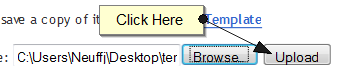
Step 6: Click "Browse" and locate the Music is Life template you just downloaded.

Step 7: Click "Upload"
Step 8: Click "Save."


Step 2: Click "Layout," then "Edit HTML."

Step 3: Be sure to back up your old template by clicking "Download Full Template".

Step 4: Installing this new template will replace any existing sidebar items (gadgets/ widgets) You may want to save your sidebar content beforehand.
Step 5: Download the Music is Life template here.

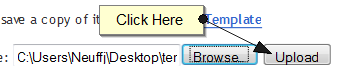
Step 6: Click "Browse" and locate the Music is Life template you just downloaded.

Step 7: Click "Upload"
Step 8: Click "Save."

Subscribe to:
Posts (Atom)